Skip to content

Freelance project · AI products

Video to Blog

Paste a YouTube link, get a clean, SEO-friendly blog post

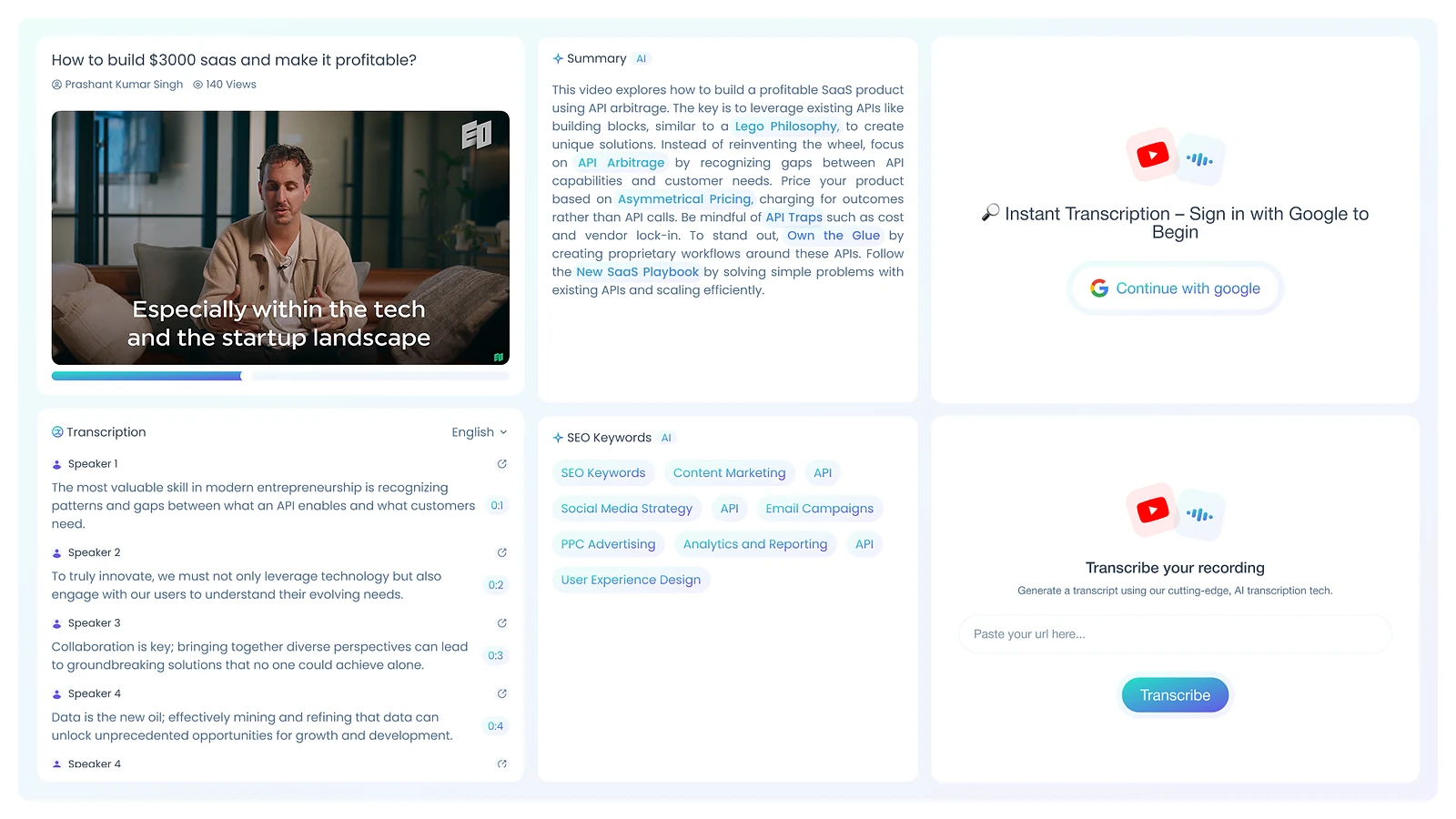
Video to Blog turns a YouTube video into a clean, SEO-friendly blog post from a single link. It’s for creators, educators and marketers who want more from the videos they already make. I designed the product and built the front-end and the LLM pipeline behind it.

Video to Blog: Transcribe, summarise, publish
Role
Design + development
Type
Freelance
Platforms
Web
Scope
UX, UI design, Front-end, LLM pipeline

01The problem

What needed solving

A good video holds a blog post’s worth of ideas, but rewriting it by hand takes time most creators don’t have, and a raw transcript reads badly as an article. The tool had to turn spoken content into structured, readable writing that still sounds like the creator.

Who it’s for

  • Video creators

    A written version of each video without writing it from scratch.

  • Teachers and educators

    Lessons turned into readable notes and articles for students.

  • Content marketers

    Search-friendly posts from video content they’ve already made.

02The main flow

From link to post

The moment in blue is the one the whole design is built around.
  1. 01

    Paste a YouTube link

  2. 02

    Video is transcribed

  3. 03

    Post is drafted

  4. 04

    Edit headings and copy

  5. 05

    Copy or export

03Structure

How Video to Blog is organised

Everything has one home. Getting this right first keeps every screen simpler.

Create

  • Link input
  • Progress view

Editor

  • Title and headings
  • Post body
  • Meta description

Export

  • Copy post
  • Download

Library

  • Past posts
  • Source video

04Key decisions

Choices that shaped it

What I considered, what I chose, and why.

Decision 01

A staged pipeline with visible progress

Turning a video into a post takes a while, and a single spinner leaves users wondering if anything is happening.

Considered

One LLM call from transcript to finished post, behind a loading spinner.

Chosen

I split the work into stages (transcribe, summarise, structure, write) and show each stage as it completes.

Why it works

Smaller steps were easier to tune and debug, and visible stages tell users what is happening during the wait.
Decision 02

A post, not a transcript

Spoken language repeats itself and wanders, so even a cleaned-up transcript still reads like speech.

Considered

A tidied transcript with timestamps as the output.

Chosen

The pipeline rewrites the content as an article with a title, an intro, headed sections and a conclusion.

Why it works

Readers and search engines both expect an article’s structure. The transcript is the input, not the product.

Decision 03

Edit before export

AI drafts come close but are rarely final, and creators want the post in their own voice.

Considered

A one-click download of the generated post.

Chosen

The post opens in an editor with title, headings and meta description ready to change, then copies out in one click.

Why it works

A quick edit keeps the creator in charge of what goes out under their name, and SEO fields are hard to forget when they sit on the page.

05What’s inside

Key features

Link to post

Paste a YouTube link and get a full blog draft back.

Automatic transcription

Turns the video’s audio into text as the first stage of the pipeline.

AI rewriting

Restructures spoken content into an article with clear headings.

SEO basics

Drafts a title, headings and meta description written for search.

Built-in editor

Lets creators edit the post before they copy it out.

06How it was built

Designed and built

I designed it and wrote the code, so the design survived contact with reality.

Interface

  • React
  • Next.js
  • Rich-text editor

Services

  • Node.js
  • Python
  • Background jobs

AI

  • Speech-to-text
  • OpenAI/LLM APIs
  • Staged prompts

Data

  • PostgreSQL
  • Post history

07Outcome

What was delivered

Delivered

  • Single-page flow from link to finished post
  • Staged pipeline: transcribe, summarise, structure, write
  • Progress view for each stage
  • Editor with title, headings and meta description
  • Front-end built and connected to the LLM pipeline

What I learned

  1. 01

    Breaking one big AI step into small ones made the output easier to tune and the wait easier to explain.

  2. 02

    The transcript was never the product. Users wanted something they could publish.

Next step

Tell me what you're building.
I'll tell you how I'd ship it.

Pick a time that suits you. You'll leave the call with a clear next step, whether we work together or not.

Book a free call

Free · 30 minutes · No commitment

Prefer email? prashantkumarsingh.work@gmail.com