Skip to content

Freelance project · AI products

Smart Calendar

A calendar that plans around how you work, not just when

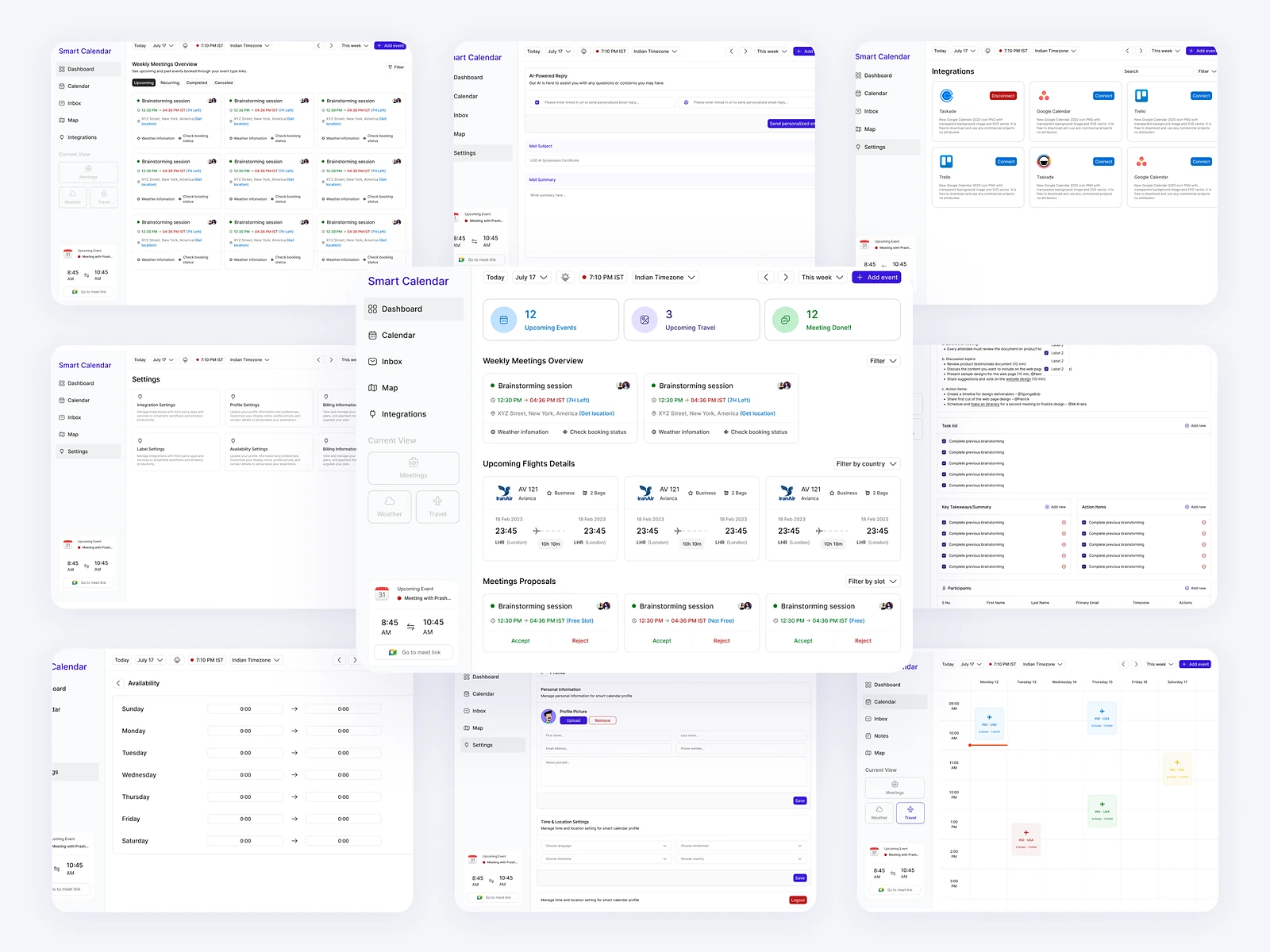
Smart Calendar is an AI calendar that learns work patterns, deadlines and preferences, and helps people plan their week with less friction. It’s for busy professionals whose days fill up faster than they can plan them. I designed it and built the front-end.

Smart Calendar: AI planning that learns you
Role
Design + development
Type
Freelance
Platforms
Web
Scope
UX, UI design, Front-end

01The problem

What needed solving

Calendars record time but don’t help decide how to use it, so people juggle deadlines, meetings and focus work in their heads. An AI that rearranges someone’s week also has to earn trust, because a calendar that moves things unasked soon feels out of control.

Who it’s for

  • Busy professionals

    A week planned around their deadlines and best hours.

  • Makers and engineers

    Protected focus time that meetings don’t eat into.

  • Team leads

    Room for their own work between team commitments.

02The main flow

From busy week to clear plan

The moment in blue is the one the whole design is built around.
  1. 01

    Connect your calendar

  2. 02

    Set work preferences

  3. 03

    Review suggested plan

  4. 04

    Accept or adjust

  5. 05

    Follow the day

03Structure

How Smart Calendar is organised

Everything has one home. Getting this right first keeps every screen simpler.

Plan

  • Week view
  • Day plan
  • Suggestions

Tasks

  • Deadlines
  • Focus blocks

Preferences

  • Working hours
  • Focus times
  • Meeting limits

Settings

  • Connected calendars
  • Notifications

04Key decisions

Choices that shaped it

What I considered, what I chose, and why.

Decision 01

Suggestions, not automatic moves

An AI that reshuffles a calendar on its own can break plans people made with others.

Considered

Auto-scheduling that moves events and focus blocks without asking.

Chosen

The AI proposes blocks as drafts; people accept, adjust or dismiss them, and only accepted blocks become events.

Why it works

Control matters more than speed in a calendar. Each accept or dismiss also tells the AI more about what the person wants.
Decision 02

Draft blocks look different

Once AI adds to a calendar, people need to tell at a glance what’s confirmed and what’s only proposed.

Considered

Showing suggestions in a side list next to the calendar.

Chosen

Suggested blocks appear in the grid where they would land, with a dashed outline and lighter fill, and turn solid when accepted.

Why it works

Seeing a suggestion in place makes the trade-off obvious, and the change of style makes accepted plans unmistakable.

Decision 03

Deadlines that claim time

A deadline on a calendar is a reminder, not a plan, so the work piles up the day before.

Considered

Deadlines shown as all-day markers at the top of the day.

Chosen

Each deadline carries the time it needs, and the AI suggests focus blocks before it.

Why it works

It turns a due date into a plan and shows early when a week can’t fit everything.

05What’s inside

Key features

Smart week view

Shows meetings, deadlines and suggested focus blocks in one grid.

AI suggestions

Proposes focus time and task blocks from work patterns and preferences.

Deadline planning

Reserves time before each deadline instead of only flagging the date.

Work preferences

Sets working hours, focus times and meeting limits in a short setup.

Gentle reminders

Nudges people before planned focus time and upcoming deadlines.

06How it was built

Designed and built

I designed it and wrote the code, so the design survived contact with reality.

Interface

  • React
  • Next.js
  • Calendar grid with drag and resize

Services

  • Node.js
  • Calendar sync

AI

  • LLM APIs
  • Scheduling suggestions

Data

  • PostgreSQL
  • Preferences and history

07Outcome

What was delivered

Delivered

  • Week view and day plan with suggestion states
  • Accept, adjust and dismiss flow for AI suggestions
  • Deadline planning with focus blocks
  • Preferences setup
  • React front-end with a reusable calendar grid

What I learned

  1. 01

    With AI in a personal tool, asking costs less than undoing.

  2. 02

    A clear visual difference between draft and confirmed did more for trust than any explanation text.

Next step

Tell me what you're building.
I'll tell you how I'd ship it.

Pick a time that suits you. You'll leave the call with a clear next step, whether we work together or not.

Book a free call

Free · 30 minutes · No commitment

Prefer email? prashantkumarsingh.work@gmail.com