Skip to content

Freelance project · AI products

AI Calls

A voice agent that answers, qualifies and books, around the clock

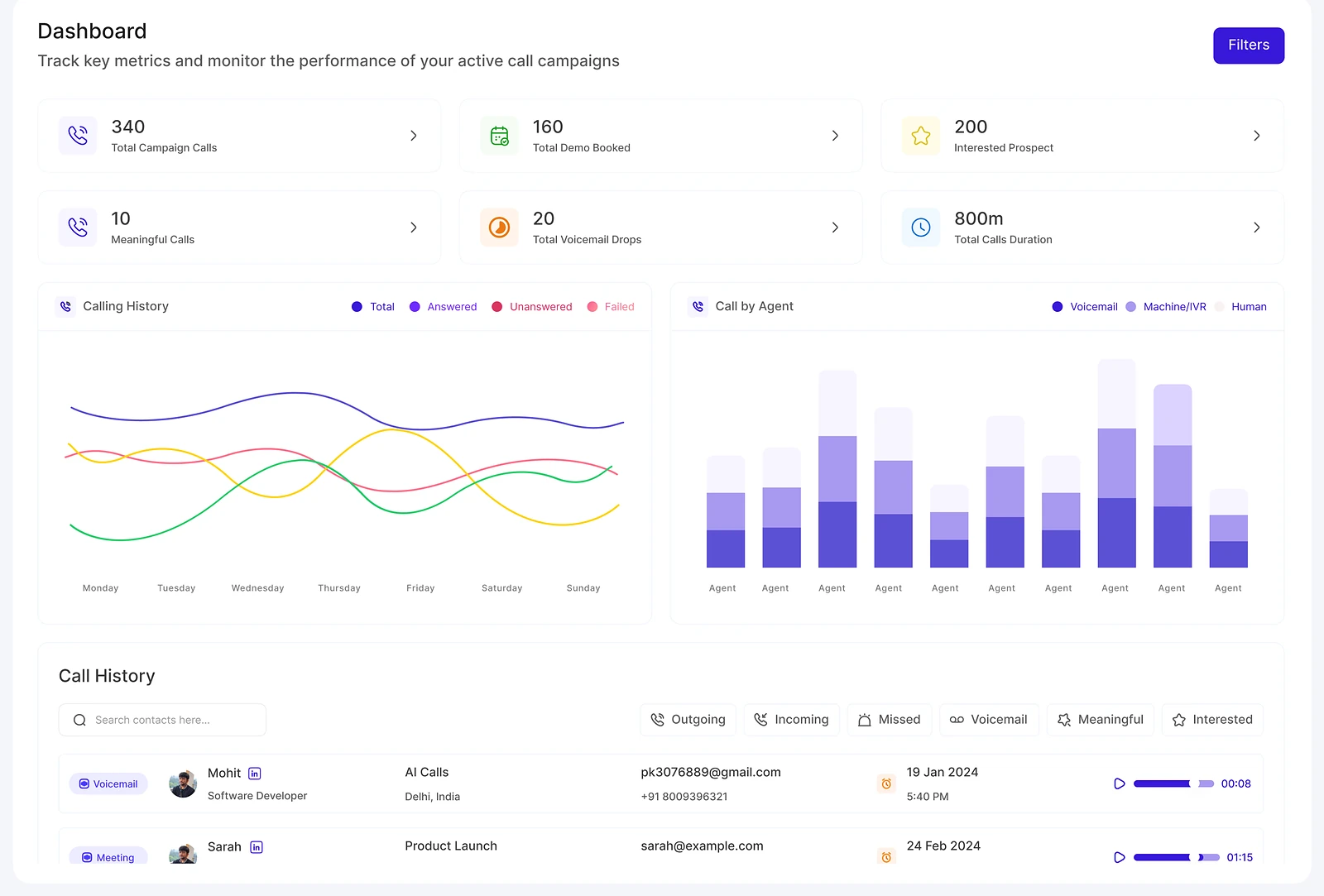
AI Calls is a voice assistant that handles incoming and outgoing calls: it qualifies leads, answers FAQs and books appointments, 24/7. I designed and built the web app teams use to run it, from campaign dashboards and call history to lead lists, workflows and integrations.

AI Calls: Voice AI agent for calls
Role
Design + development
Type
Freelance
Platforms
Web
Scope
UX, UI design, Front-end, Integrations

01The problem

What needed solving

A voice agent can take calls all day, but the team behind it still needs to know who it spoke to, what happened and what comes next. The product had to make a constant stream of automated calls as traceable as a sales rep’s notes, and let non-technical teams change how the agent behaves.

Who it’s for

  • Sales teams

    Qualified leads and booked meetings without dialling every number themselves.

  • Support teams

    FAQs answered at any hour, with a clear handover when a person is needed.

  • Operations leads

    Campaign metrics and call history they can check at a glance.

  • Workspace admins

    Workflows, integrations and tags they can set up without code.

02The main flow

From list to booked meeting

The moment in blue is the one the whole design is built around.
  1. 01

    Import a lead list

  2. 02

    Launch a campaign

  3. 03

    Agent makes calls

  4. 04

    Review call outcomes

  5. 05

    Meeting gets booked

03Structure

How AI Calls is organised

Everything has one home. Getting this right first keeps every screen simpler.

Dashboard

  • Campaign metrics
  • Quick statistics

Calls

  • Call history
  • Call details

Leads

  • Scraped lists
  • Lead details

Automation

  • Workflow builder
  • Integrations
  • Tasks

Settings

  • Custom tags
  • Controls

04Key decisions

Choices that shaped it

What I considered, what I chose, and why.

Decision 01

Call history organised by lead

A call log sorted by time shows what happened today, but not where a lead stands after several calls.

Considered

A flat, time-ordered log of every call.

Chosen

Every call is tied to a lead: the lead detail shows each call, its outcome and the next task, and the call history links straight to it.

Why it works

Teams think in leads, not calls. One record per person means a booked meeting or a missed callback is never lost in a long log.
Decision 02

A visual workflow, not a settings form

What the agent does after a call branches: book a slot, send a follow-up, create a task or hand over to a person.

Considered

A long settings form with a toggle for each possible follow-up.

Chosen

I designed a visual workflow builder where each step is a block and each call outcome is a branch, with integrations as steps in the same flow.

Why it works

Branching logic is easier to read as a picture than as nested toggles, and teams can see the whole path before they switch it on.

Decision 03

Campaigns first, single calls second

Once the agent runs 24/7, nobody can review every call, so the team needs to know where to look.

Considered

Opening the app on a feed of the latest calls.

Chosen

The dashboard opens on active campaigns and their key metrics, and lets teams drill into the calls behind any number.

Why it works

Managers decide at campaign level, such as pausing a campaign or changing its workflow, and only drop to single calls when a number looks wrong.

05What’s inside

Key features

Campaign dashboard

Tracks the key metrics of every active call campaign in one view.

Call history

Lists every incoming and outgoing call with its lead and outcome.

Scraped lead lists

Brings scraped prospect lists into one place, ready for a campaign.

Workflow builder

Sets what happens after each call, from booking to follow-up tasks.

Settings and tags

Custom tags and controls let each team fit the agent to its pipeline.

06Screens

Selected screens

Tap any screen to open it full size.

07How it was built

Designed and built

I designed it and wrote the code, so the design survived contact with reality.

Interface

  • React
  • Next.js
  • Flow canvas
  • Shared component library

Services

  • Node.js
  • REST APIs
  • Integration webhooks

AI and voice

  • LLM APIs
  • Speech-to-text
  • Text-to-speech

Data

  • PostgreSQL
  • Call and lead records

08Outcome

What was delivered

Delivered

  • Campaign dashboard with quick statistics
  • Call history, lead details and scraped list views
  • Visual workflow builder with integrations and task management
  • Settings and custom tags
  • React front-end built on shared components

What I learned

  1. 01

    With voice AI, the product isn’t the call. It’s everything a team needs to trust that the call went well.

  2. 02

    A visual workflow made automation feel safe to change for people who would never edit a config file.

Next step

Tell me what you're building.
I'll tell you how I'd ship it.

Pick a time that suits you. You'll leave the call with a clear next step, whether we work together or not.

Book a free call

Free · 30 minutes · No commitment

Prefer email? prashantkumarsingh.work@gmail.com