Skip to content

Freelance project · Mobile apps

Safe Bump

Support for pregnancy and new motherhood, from tracking to community

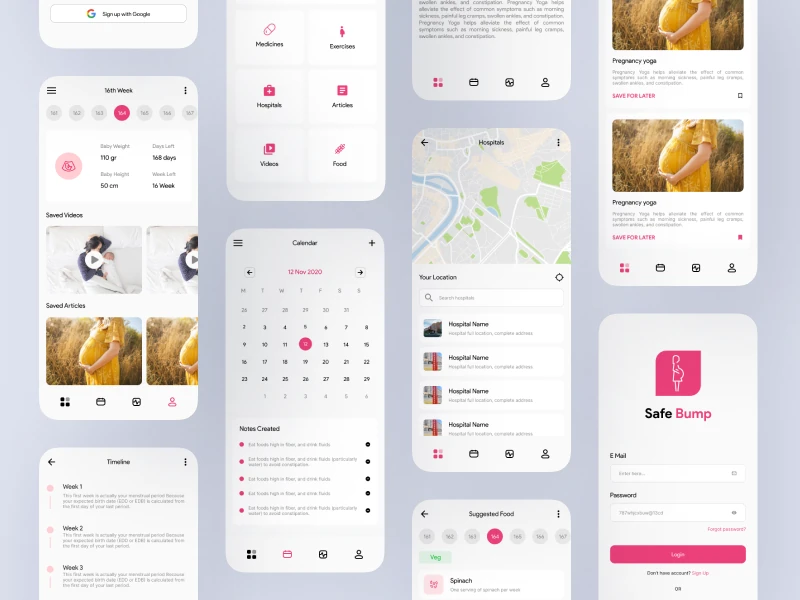
Safe Bump is a maternal health mobile app for pregnant women and new mothers. It brings health tracking, educational resources, an appointment scheduler and community support into one place. I designed the app’s flows and interface for iOS and Android.

Safe Bump: Pregnancy and new-mother app
Role
Product design
Type
Freelance
Platforms
iOS, Android
Scope
UX, UI design, Mobile

01The problem

What needed solving

Pregnant women and new mothers juggle check-ups, symptoms, advice from many sources and worries at odd hours. Most apps cover only one part, so information is split across tools and forums. Safe Bump had to bring these together without overwhelming someone who is already tired.

Who it’s for

  • Expecting mothers

    Track their health and know what to expect at each stage.

  • New mothers

    Get support with recovery and caring for a newborn.

  • First-time parents

    Find reliable, plain information they can trust.

02The main flow

A week in pregnancy

The moment in blue is the one the whole design is built around.
  1. 01

    Open this week’s view

  2. 02

    Log a health check

  3. 03

    Read stage guidance

  4. 04

    Book the next appointment

  5. 05

    Ask the community

03Structure

How Safe Bump is organised

Everything has one home. Getting this right first keeps every screen simpler.

Home

  • This week
  • Reminders
  • Daily tips

Track

  • Health log
  • Symptoms
  • History

Learn

  • Articles
  • By stage
  • Saved

Appointments

  • Calendar
  • Upcoming
  • Notes

Community

  • Groups
  • Questions
  • My posts

04Key decisions

Choices that shaped it

What I considered, what I chose, and why.

Decision 01

A home that follows the stage

Needs in early pregnancy are very different from those in the weeks after birth.

Considered

A fixed home with the same tiles for everyone.

Chosen

Home adapts to the user’s stage, showing the tracking, reminders and reading that fit that week.

Why it works

People see what is relevant without searching. The app grows with them instead of feeling out of date.
Decision 02

Quick logs over long forms

Tired users skip tracking when it feels like paperwork.

Considered

Detailed health forms with many fields for each entry.

Chosen

I designed one-tap logs for common entries, with an optional note for detail.

Why it works

Small, regular logs give a clearer picture than rare long ones. Detail is still there when it matters.

Decision 03

Community apart from medical guidance

Advice from other mothers is comforting but can be mistaken for medical guidance.

Considered

Mix community posts and articles in one feed.

Chosen

Community and learning are separate spaces with different styling, and health content is clearly marked as guidance.

Why it works

Both matter, but they carry different weight. Keeping them apart helps people know which is which.

05What’s inside

Key features

Stage-aware home

Shows what matters for this week of pregnancy or motherhood.

Health tracking

Quick logs for health checks and symptoms.

Learning resources

Educational content organised by stage.

Appointment scheduler

Book and keep track of check-ups in the app.

Community support

A space to ask questions and share with other mothers.

06Outcome

What was delivered

Delivered

  • User flows from pregnancy through the early months of motherhood
  • UI design for home, tracking, learning, appointments and community on iOS and Android
  • A calm visual style with clear, plain copy
  • Components and states ready for development

What I learned

  1. 01

    Designing for tired people means removing steps, not adding help text.

  2. 02

    Health guidance and community content need different visual weight, even in the same app.

Next step

Tell me what you're building.
I'll tell you how I'd ship it.

Pick a time that suits you. You'll leave the call with a clear next step, whether we work together or not.

Book a free call

Free · 30 minutes · No commitment

Prefer email? prashantkumarsingh.work@gmail.com