Skip to content

Freelance project · AI products · Ongoing

Agentic SOC Platform

AI agents triage every alert, analysts make the calls that matter

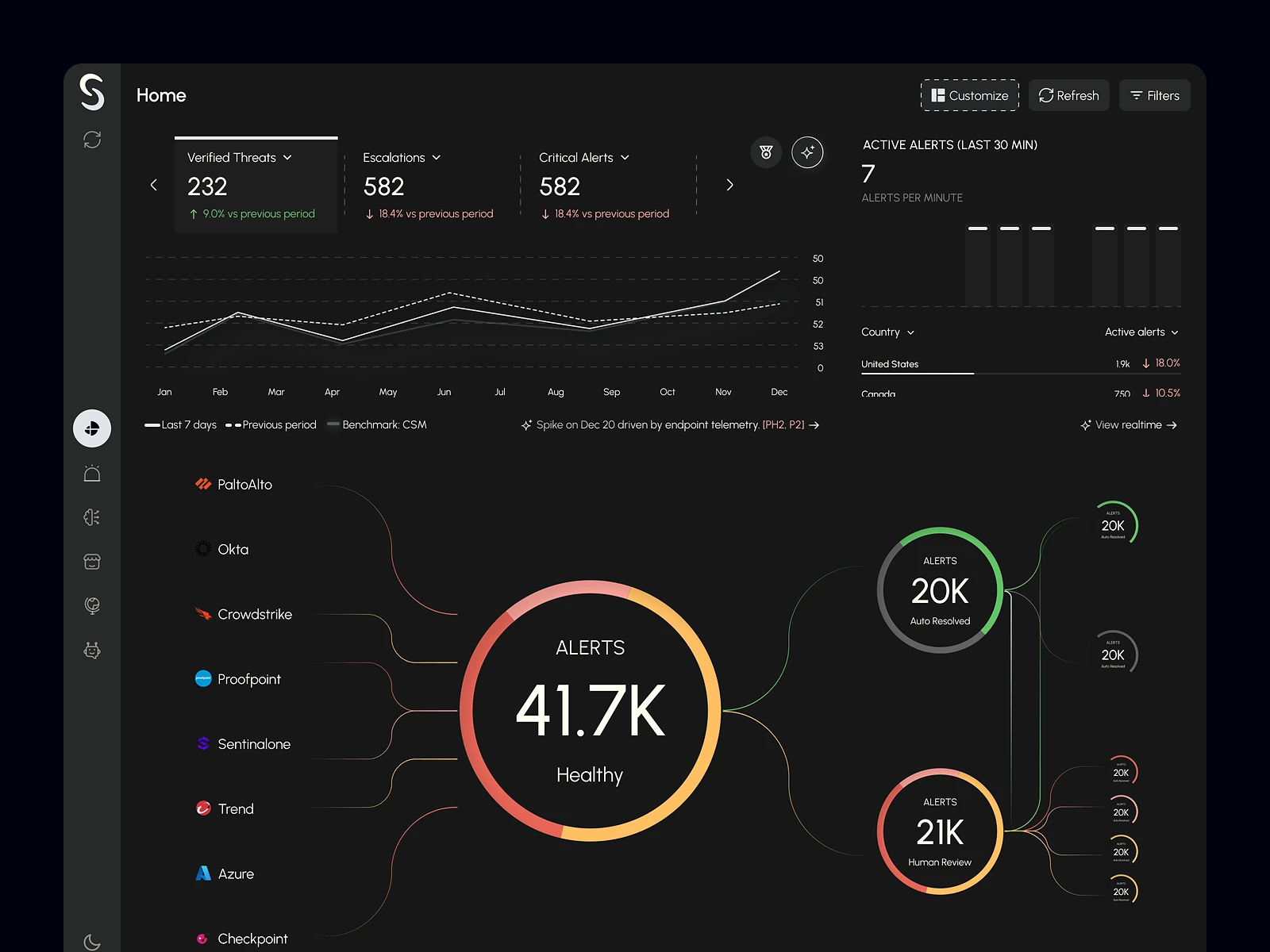
A security operations platform where AI agents triage and investigate alerts, and human analysts approve, escalate or override what they find. I have designed it since December 2025: the classic and agentic home, the alert table, the investigation view, analytics, agent settings and the full design system. The work is ongoing.

Agentic SOC Platform: AI agents for security operations
Role
Product design
Type
Freelance
Platforms
Web
Scope
Product strategy, UX, UI design, Data visualisation

01The problem

What needed solving

Security teams get more alerts than analysts can read, and most of them turn out to be noise. AI agents can triage and investigate at that volume, but a SOC will only act on their verdicts if analysts can see how each one was reached and stay in control of what happens next.

Who it’s for

  • SOC analysts

    Clear verdicts with the evidence behind them, so they can approve, escalate or override fast.

  • SOC leads

    A view of alert health, response times and agent performance across the team.

  • Threat hunters

    Quick IOC lookups and MITRE ATT&CK patterns to find what the queue doesn’t show.

  • Platform admins

    Control over which tools each agent can read from or write to.

02The main flow

From alert to decision

The moment in blue is the one the whole design is built around.
  1. 01

    Alert comes in

  2. 02

    Agents investigate

  3. 03

    Review agent findings

  4. 04

    Approve or override

  5. 05

    Log and close

03Structure

How Agentic SOC Platform is organised

Everything has one home. Getting this right first keeps every screen simpler.

Home

  • Classic dashboard
  • Agentic dashboard
  • Live agent log

Alerts

  • Alert table
  • Alert detail
  • Investigation graph
  • Recommended actions

Investigations

  • Investigations overview
  • Alert lifecycle

Analytics

  • MITRE ATT&CK
  • MTTD, MTTR and MTTI
  • Agent agreement

Agents and tools

  • Agent details
  • Tool permissions
  • Analyst workbench

04Key decisions

Choices that shaped it

What I considered, what I chose, and why.

Decision 01

Agents recommend, analysts decide

Agents reach a verdict in seconds, but steps like isolating a host or resetting credentials can disrupt a business if the verdict is wrong.

Considered

Letting agents carry out every recommended action on their own and reporting afterwards.

Chosen

Agents investigate and enrich on their own, then recommend a step such as Approve; anything that changes a system waits for an analyst. Each agent’s connected tools are marked read-only or read-write.

Why it works

Autonomy goes where mistakes are cheap, and a person stays on the steps that are hard to undo. Per-tool permissions let a team widen that autonomy one tool at a time as trust builds.
Decision 02

Show the reasoning as a graph

A verdict on its own asks analysts to take the AI on trust, and a wall of agent logs is too slow to read under pressure.

Considered

A single confidence score with a long text log underneath.

Chosen

I designed an investigation graph that shows which agents worked on the alert, from threat intel and reasoning to triage, and how their findings came together. Key findings, confidence, a summary and a conclusion follow in plain language.

Why it works

Analysts can check the path, not just the answer, and jump to the agent whose finding looks wrong. Disagreement between agents becomes visible instead of being hidden in an average.

Decision 03

A dense table built for triage

The alert queue holds thousands of rows, and analysts need to spot what matters and deal with many alerts at once.

Considered

A card layout with more space per alert, which looks calmer but shows a fraction of the queue.

Chosen

I kept a dense table with severity chips, sources and verdicts in fixed columns, filters and bulk select on top, and pagination. A min-view opens an alert’s summary without leaving the list.

Why it works

Analysts scan columns, not cards, and the min-view saves a full page change for alerts that only need a glance. Bulk actions clear the noise so attention goes to the real threats.

05What’s inside

Key features

Chief Planner

Orchestrates the Knowledge Researcher, Goal Planner, Investigation Router and Performance Evaluator agents, with a live log of their work.

Investigation graph

Shows how threat intel, reasoning and triage agents reached a verdict, with key findings and confidence.

Recommended actions

Suggests steps such as quarantining a message, isolating a host or resetting credentials, each waiting for an analyst.

Audit-trail notes

Every status change carries a short note, so later reviews show who decided what and why.

Analyst workbench

Looks up any hash, IP, URL or domain and enriches it from threat-intelligence sources.

MITRE ATT&CK analytics

Maps alerts to tactics and tracks true and false positives, confidence, MTTD, MTTR and MTTI.

06Screens

Selected screens

Tap any screen to open it full size.

07Outcome

What was delivered

Delivered

  • Classic and agentic home dashboards, including the Chief Planner and live agent log
  • Alert table, alert min-view and alert detail with the investigation graph and human-in-the-loop approval
  • Investigations overview, alert lifecycle view, analyst workbench and MITRE ATT&CK analytics
  • Agent detail pages with task breakdowns and read-only or read-write tool permissions
  • Light and dark themes and a full design system, from severity chips to agent cards

What I learned

  1. 01

    In an agentic product, the most important screen is the one where a person checks the AI’s work. I spent the most time there.

  2. 02

    Trust comes from showing the path to a verdict, not from a higher confidence number.

  3. 03

    Dense is not the same as cluttered. Analysts want more on screen, as long as it’s in a clear order.

Next step

Tell me what you're building.
I'll tell you how I'd ship it.

Pick a time that suits you. You'll leave the call with a clear next step, whether we work together or not.

Book a free call

Free · 30 minutes · No commitment

Prefer email? prashantkumarsingh.work@gmail.com