Skip to content

Freelance project · SaaS

TestGuard

Know whether a release is safe before it reaches users

TestGuard is a QA and deployment monitoring dashboard that tracks test coverage, risk levels, release confidence and staging performance in one place. It is for engineering and QA teams who want safer, faster releases without reading raw test reports. I designed the product and built its front-end.

TestGuard: QA and release monitoring
Role
Design + development
Type
Freelance
Platforms
Web
Scope
UX, UI design, Dashboards, Front-end

01The problem

What needed solving

Before a release, teams piece together test results, coverage reports and staging metrics from different tools. Each signal is useful on its own, but nobody has one view that says whether a build is safe to ship. The hard part was turning many technical signals into a decision people could trust.

Who it’s for

  • QA engineers

    See which areas lack coverage and which tests fail or flake most often.

  • Engineering leads

    Get a clear go or no-go view before each release.

  • Developers

    Find the failing test or slow endpoint behind a warning without digging.

02The main flow

From build to release decision

The moment in blue is the one the whole design is built around.
  1. 01

    New build arrives

  2. 02

    Tests and coverage update

  3. 03

    Review release confidence

  4. 04

    Drill into risky areas

  5. 05

    Decide to ship

03Structure

How TestGuard is organised

Everything has one home. Getting this right first keeps every screen simpler.

Overview

  • Release confidence
  • Risk summary
  • Recent builds

Coverage

  • By module
  • Trends
  • Uncovered areas

Risk

  • Risk levels
  • Failing tests
  • Flaky tests

Staging

  • Performance
  • Errors
  • Build comparison

Settings

  • Integrations
  • Thresholds

04Key decisions

Choices that shaped it

What I considered, what I chose, and why.

Decision 01

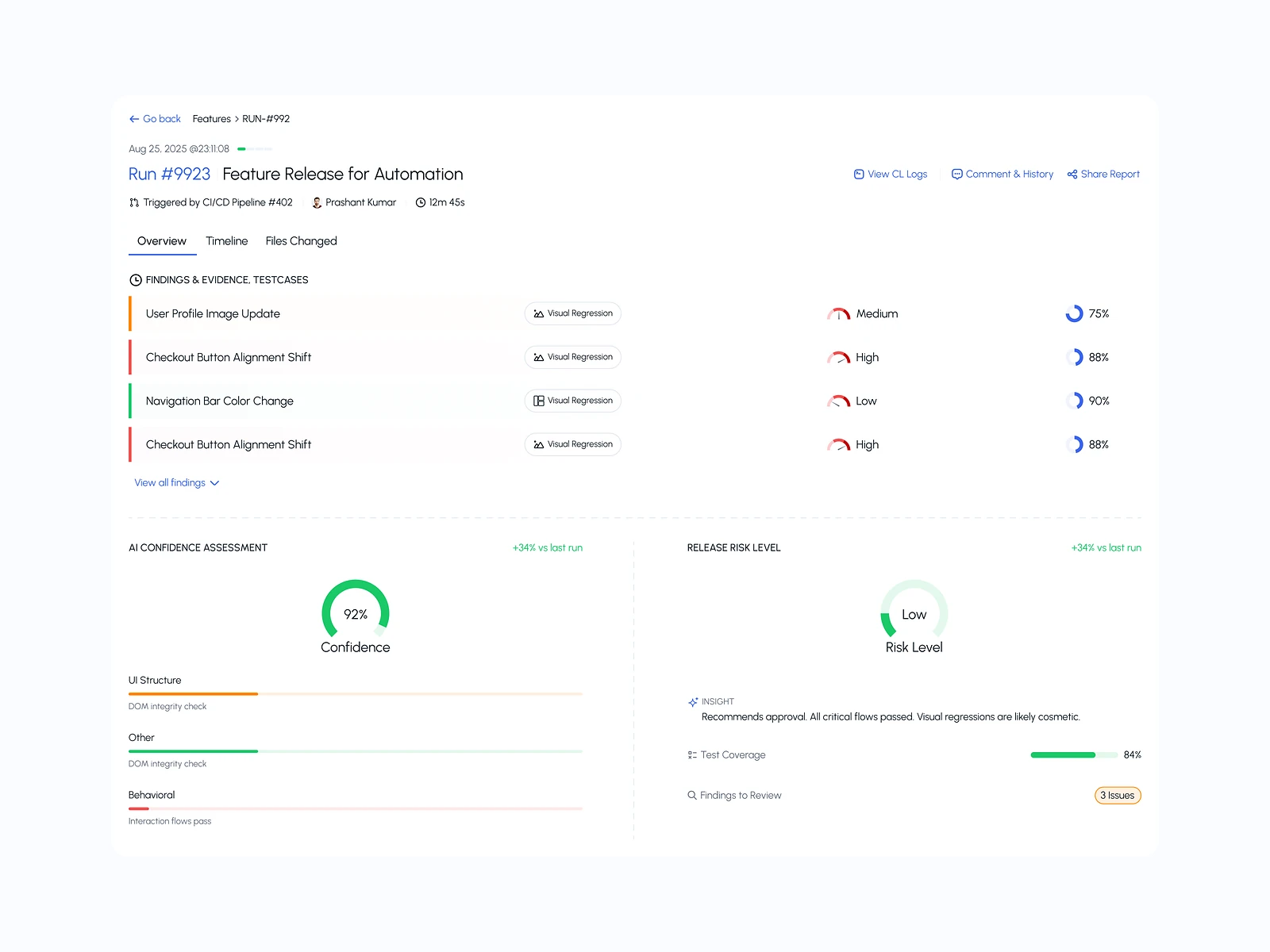
Confidence with its reasons attached

A single release confidence level is easy to read but easy to distrust. If people can’t see why it dropped, they ignore it.

Considered

Show only a pass or fail badge for each build.

Chosen

I paired the confidence level with the signals that moved it most, each linked to its detail screen.

Why it works

People trust a score they can question. Showing the reasons turns the overview into a starting point for action, not a verdict.
Decision 02

Risk by area, not by test

A flat list of failing tests hides where the risk sits. A few failures in a core module matter more than many in minor screens.

Considered

A long sortable table of every test result as the main view.

Chosen

I grouped coverage and failures by module and showed a risk level for each area, with the test list one click below.

Why it works

Leads decide by area, not by test. The full table is still there for the person who has to fix it.

Decision 03

Staging performance beside test results

Tests can pass while staging gets slower, and that often shows up only after release.

Considered

A separate performance tab that nobody opens before shipping.

Chosen

I put staging response times and errors on the same overview as tests and coverage, compared with the previous build.

Why it works

A release decision needs both views at once. Keeping them together makes a slow build as visible as a failing one.

05What’s inside

Key features

Release confidence

One view of whether a build is ready, with the reasons beside it.

Coverage tracking

Coverage by module and over time, so gaps are easy to spot.

Risk flags

Areas with rising risk or flaky tests are flagged before release.

Staging performance

Response times and errors on staging, next to the test results.

Build history

Every build with its tests, coverage and confidence, ready to compare.

06How it was built

Designed and built

I designed it and wrote the code, so the design survived contact with reality.

Interface

  • React
  • TypeScript
  • Chart and table components

Services

  • Node.js API
  • CI webhooks
  • Test report parsers

Data

  • PostgreSQL
  • Build history

Infrastructure

  • Docker
  • AWS

07Outcome

What was delivered

Delivered

  • Product design for the overview, coverage, risk and staging screens
  • A release confidence view linked to the signals behind it
  • A React front-end with reusable chart, table and status components
  • A data layer that keeps test sources separate from the interface

What I learned

  1. 01

    A score earns trust only when people can see what moved it.

  2. 02

    Dashboards for engineers work best when each screen answers one question and the rest sits one click down.

Next step

Tell me what you're building.
I'll tell you how I'd ship it.

Pick a time that suits you. You'll leave the call with a clear next step, whether we work together or not.

Book a free call

Free · 30 minutes · No commitment

Prefer email? prashantkumarsingh.work@gmail.com