Skip to content

Freelance project · SaaS

PSM Screening Platform

Dynamic intake forms in front, a clear review dashboard behind

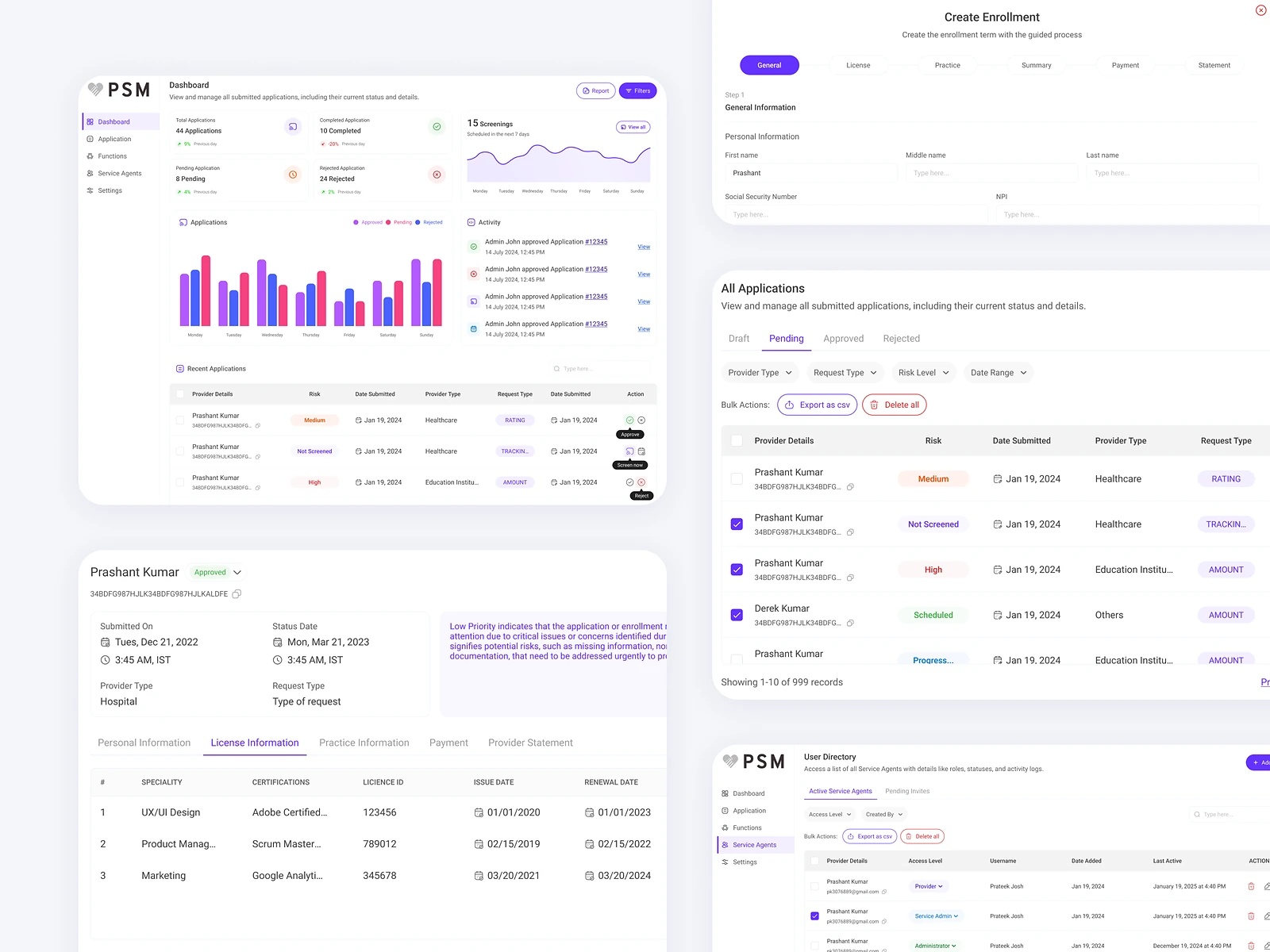
PSM Screening Platform streamlines complex intake and screening through smart form submissions. People fill in dynamic forms, and internal agents review, verify and act on the data in a dashboard. I designed both sides: the forms and the agent workspace.

PSM Screening Platform: Smart intake and review
Role
Product design
Type
Freelance
Platforms
Web
Scope
UX, UI design, Forms, Dashboards

01The problem

What needed solving

Screening for eligibility, onboarding or support needs a lot of information, and long static forms put people off. On the other side, agents receive submissions with missing or unclear data and spend time chasing it. The platform had to make filling in easier and reviewing faster at the same time.

Who it’s for

  • Applicants

    Answer only the questions that apply to them and see how far they are.

  • Review agents

    See each submission laid out so they can verify it and decide quickly.

  • Team leads

    See the queue, workload and decisions across agents.

02The main flow

From submission to decision

The moment in blue is the one the whole design is built around.
  1. 01

    Start the intake form

  2. 02

    Answer dynamic questions

  3. 03

    Submit the form

  4. 04

    Agent verifies details

  5. 05

    Decision and next step

03Structure

How PSM Screening Platform is organised

Everything has one home. Getting this right first keeps every screen simpler.

Intake

  • Dynamic form
  • Progress
  • Saved drafts

Queue

  • New submissions
  • In review
  • Needs info

Submission

  • Answers
  • Verification checklist
  • Notes
  • Decision

Admin

  • Form setup
  • Agents
  • Reports

04Key decisions

Choices that shaped it

What I considered, what I chose, and why.

Decision 01

Branching forms over one long form

A single form that covers every case asks most people questions that don’t apply to them.

Considered

One long form with optional sections people skip themselves.

Chosen

Questions branch on earlier answers, so each person sees only what applies, with progress shown by section.

Why it works

Shorter paths are easier to finish and easier to answer correctly. Agents get cleaner data as a result.
Decision 02

Verification as a checklist

Agents had to read a whole submission to work out what still needed checking.

Considered

Show the raw answers and let each agent verify in their own way.

Chosen

Each submission opens with a short checklist of items to verify, linked to the answers they relate to, beside the decision buttons.

Why it works

The checklist makes review consistent across agents. It also shows at a glance how close a case is to a decision.

Decision 03

Needs info as its own status

Incomplete submissions either got rejected too early or sat untouched while agents waited for answers.

Considered

Use only approved and rejected states.

Chosen

I added a Needs info status that sends a request back to the applicant and keeps the case in its own queue.

Why it works

It separates waiting from deciding. Agents can see what is blocked on them and what is blocked on someone else.

05What’s inside

Key features

Dynamic forms

Questions adapt to earlier answers, so each person sees only what applies.

Inline validation

Missing or invalid answers are flagged before the form is submitted.

Review queue

Submissions grouped by status, so agents know what to pick up next.

Verification checklist

Each case lists what to check, linked to the answers it concerns.

Team overview

Leads see workload and decisions across agents.

06Outcome

What was delivered

Delivered

  • Flows for applicants and review agents, from first question to decision
  • Dynamic form design with branching, validation, progress and saved drafts
  • Agent dashboard with queue, submission view, verification checklist and decision actions
  • Status and component states documented for development

What I learned

  1. 01

    A good intake form is half of a good review tool.

  2. 02

    Designing the waiting states, not just the decisions, is what keeps a queue moving.

Next step

Tell me what you're building.
I'll tell you how I'd ship it.

Pick a time that suits you. You'll leave the call with a clear next step, whether we work together or not.

Book a free call

Free · 30 minutes · No commitment

Prefer email? prashantkumarsingh.work@gmail.com