Skip to content

In-house · Ringover · AI products

Ringover

Designing conversational AI that sales teams use on every call

At Ringover I work as an in-house product designer on Empower, a call intelligence platform for sales teams, and on the products around it: the mobile app, Simless and AIRO Coach. I take features from a fuzzy problem to shipped screens, across web, iOS, Android and browser extensions, and build many of them in code.

Ringover: Conversational AI for sales teams
Role
Product designer (in-house)
Type
In-house, full-time
Platforms
Web, iOS, Android, Browser extension
Scope
Product thinking, UX research, Interaction design, UI design

01The problem

What needed solving

A sales call produces a lot: a recording, a transcript, an AI summary, flags, coaching signals and follow-up tasks. Reps and managers had the data but not the answers, and each answer lived on a different page. The work was to turn conversations into decisions people could act on in seconds, without making a busy product busier.

Who it’s for

  • Sales reps

    Know what to do next after every call, without digging through a transcript.

  • Sales managers

    See who needs coaching and why, across the whole team, in one place.

  • Revenue leaders

    Trust the patterns behind the pipeline, not just the numbers.

  • Admins

    Give the right people the right licences and tools without filing a ticket.

02Structure

How Empower is organised

Everything has one home. Getting this right first keeps every screen simpler.

Work

  • Ask Empower
  • Power dialer
  • Logs

Understand

  • Call Studio
  • Flags analytics
  • Skills

Improve

  • Pitch Room
  • Coaching
  • Notetaker

Admin

  • Licences
  • Integrations
  • Settings

03Inside the work

The thinking, feature by feature

Each part of the product, the problem behind it and how I approached it.

An AI revenue assistant inside the product

Ask Empower

Sales data was scattered across calls, CRM records and reports. Getting an answer, such as which deals went quiet this week, meant exporting, filtering and guessing.

How I approached it
  • I started from the questions people actually ask on a Monday morning, not from what the model could do. Most fell into three shapes: find me a list, explain a pattern, draft the next step. Each shape got its own answer format.
  • The hardest part was trust. An assistant that is confidently wrong once is ignored forever. So answers show their reasoning steps, cite the calls and records they came from, and say when the data isn’t there.
  • Answers end in actions: launch a campaign from a generated prospect list, open the filtered view, save a report. The conversation is a faster way into the product, not a place to get stuck.
  • Prompt suggestions on the empty state teach what the assistant is good at, which mattered more than any onboarding tour.
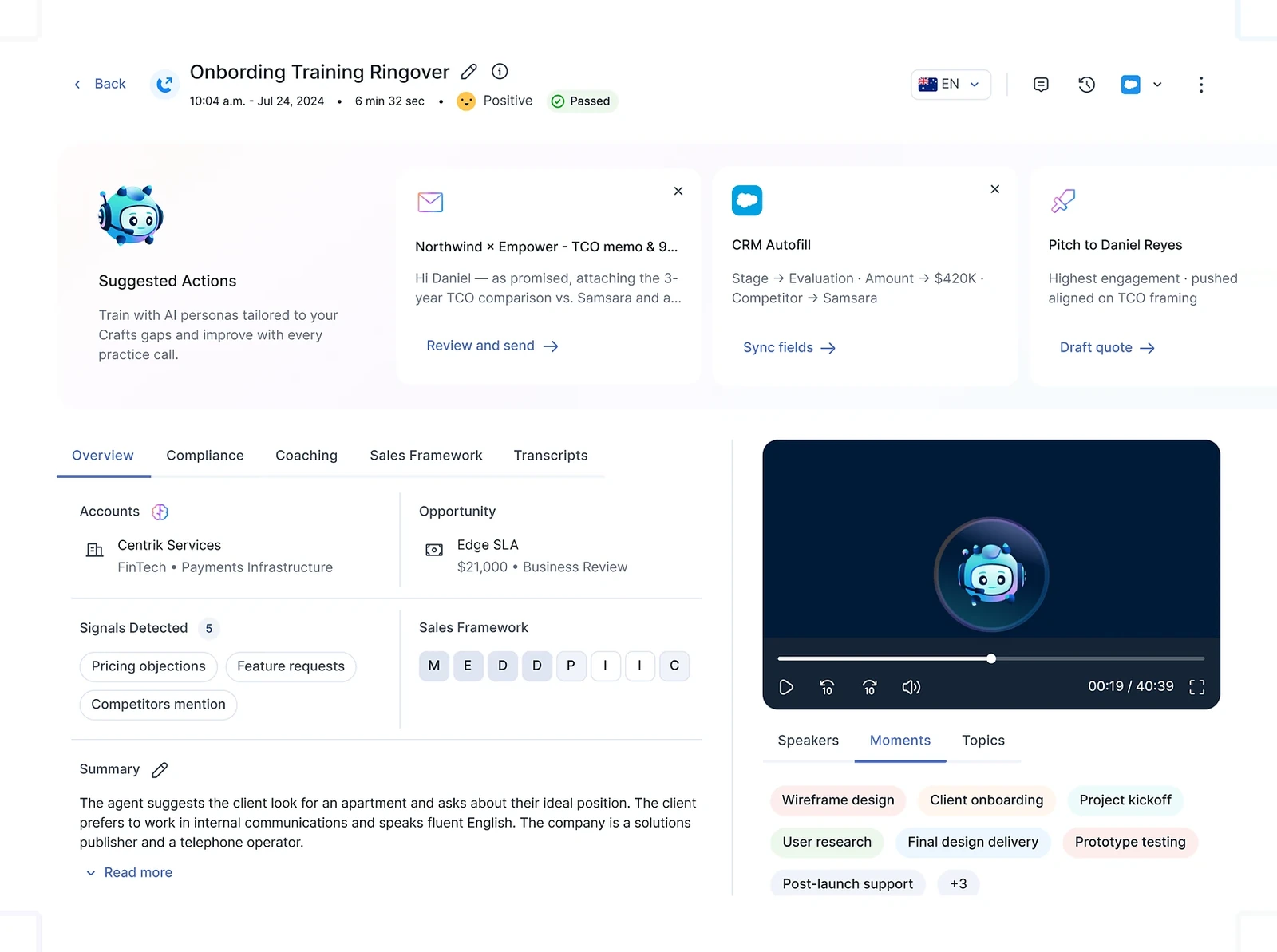
The workspace where conversations become intelligence

Call Studio and coaching

After a call, reps and managers needed the transcript, the AI summary, their notes, tags and coaching signals, but each lived in a different place, so most of it was never read.

How I approached it
  • I treated the call as the unit of work and brought everything about it into one studio: transcript, AI-generated insights, notes and tags, coaching signals, and pre- and post-call analysis.
  • The layout follows the order people think in: what happened (summary), what matters (insights and flags), what to do (actions), and the evidence (transcript) last but always one click away.
  • Managers and reps open the same call for different reasons, so the studio keeps one layout and changes the emphasis: coaching signals for managers, next steps for reps.

Evaluating performance through behaviour, not just numbers

Skills and coaching analytics

Classic sales metrics tell you volume. Managers wanted to know which skills each rep needed to work on, and to prove it with real moments from calls.

How I approached it
  • I designed the analytics around skills drawn from conversations, then built every chart so a manager can drill from team to rep to the exact call moments behind a score.
  • Comparisons are framed as coaching opportunities, not rankings. The default view shows where a rep improved and where to focus next.
  • Charts stay deliberately simple. If a manager needs a legend to read it, it doesn’t belong on the first screen.

AI-powered sales practice

Pitch Room

Reps practised on real prospects. Mistakes on live calls are costly and hard to learn from.

How I approached it
  • Pitch Room is a simulation where a rep talks to an AI persona built for a scenario, with real-time coaching, objection handling support and contextual suggestions.
  • I kept the call screen close to the real call screen, so practice builds the same muscle memory. Coaching appears at the edges, never on top of the conversation.
  • The goal was simple: help reps practise like it’s a real call, and improve instantly.

Outbound at speed, notes without typing

Power dialer and Notetaker

Outbound reps lose time between calls, and notes written after a call miss the details that matter.

How I approached it
  • Empower Reach dials several prospects at once, connects reps instantly and gives live AI coaching on every call. The design challenge was speed without chaos: one clear current call, a calm queue, and a single obvious next action.
  • The Notetaker captures and summarises key call moments automatically and shapes them into notes that follow sales frameworks, so post-call work takes seconds.

The unglamorous screens that make a product usable at scale

Logs, licences, flags and integrations

The logs page was cluttered and hard to scan; licence management was slow for big teams; recurring call signals were invisible; and connecting tools was a support ticket.

How I approached it
  • Logs: I rebuilt the page around scanning. Clear columns, strong filters and saved views turned a cluttered list into a clear, scalable data experience for calls, meetings and interactions.
  • Licences: allocation, user access and feature availability now sit in one view with bulk actions, balancing control, clarity and scale for teams of every size.
  • Flags analytics: signals such as ‘decision maker not confirmed’, ‘proposal sent’ or ‘follow-up scheduled’ roll up from single calls into patterns across the team.
  • Integrations: one hub to discover integrations, connect tools like CRMs and calendars, and manage data flow, so setup no longer needs support.

One experience across every surface

Mobile, Simless and AIRO Coach

The same rep moves between desktop, phone and browser in a day. Each surface had drifted into its own patterns.

How I approached it
  • I led UX for onboarding, call logs, campaign dialers and post-call analytics on iOS and Android, and kept them in step with the web through a shared component library.
  • Simless is an eSIM add-on that gives a mobile line without a physical SIM, logging, transcribing and summarising calls and SMS. The design job was to make a telecom product feel as simple as an app.
  • AIRO Coach brings the same coaching language to an AI voice agent, so insights read the same wherever they appear.

04Key decisions

Choices that shaped it

What I considered, what I chose, and why.

Decision 01

An assistant inside the product

Teams already had dashboards they didn’t open. Another report would not change behaviour.

Considered

A standalone AI chat page that answers general questions about the account.

Chosen

Ask Empower sits inside the product, knows the live data and answers with something you can act on: a list, a chart, a draft, a filtered view.

Why it works

Answers you can act on beat answers you can read. Keeping the assistant in context also made its limits clear: it talks about your data, not the world.

Decision 02

Behaviour, not just numbers

Call counts and talk time say who is busy, not who is good. Managers coached on gut feel.

Considered

A bigger KPI dashboard with more metrics per rep.

Chosen

Skills and coaching analytics score behaviours drawn from conversations, and every score links back to the moments that produced it.

Why it works

A score you can’t open is a score nobody trusts. Linking to the evidence turned analytics into coaching material.

Decision 03

Practice before the real call

Reps learned objection handling on live prospects, which is the most expensive place to learn.

Considered

A library of recorded best calls to watch.

Chosen

Pitch Room: a simulated call with an AI persona, real-time coaching and objection support, so reps practise like it’s a real call.

Why it works

Watching teaches what good sounds like; practising teaches how to do it. The simulation reuses the same insight models as real calls, so feedback stays consistent.

05Outcome

What was delivered

Delivered

  • Ask Empower, Call Studio, Pitch Room and the AI power dialer designed and shipped
  • Skills, coaching and flags analytics built around evidence from real calls
  • Logs, licence management, settings and an integrations hub rebuilt for scale
  • Mobile onboarding, call logs, dialers and post-call analytics for iOS and Android
  • A shared component library that keeps web, mobile and extensions consistent

What I learned

  1. 01

    AI features earn trust through boring things: sources, empty states and honest ‘I don’t know’ answers.

  2. 02

    In a product this size, the design system is the strategy. Every shortcut shows up three releases later.

  3. 03

    The best analytics screen is the one that ends in an action.

Next step

Tell me what you're building.
I'll tell you how I'd ship it.

Pick a time that suits you. You'll leave the call with a clear next step, whether we work together or not.

Book a free call

Free · 30 minutes · No commitment

Prefer email? prashantkumarsingh.work@gmail.com