Skip to content

Own product · SaaS

Cognize

A lightweight lead board that keeps contacts, stages and history together

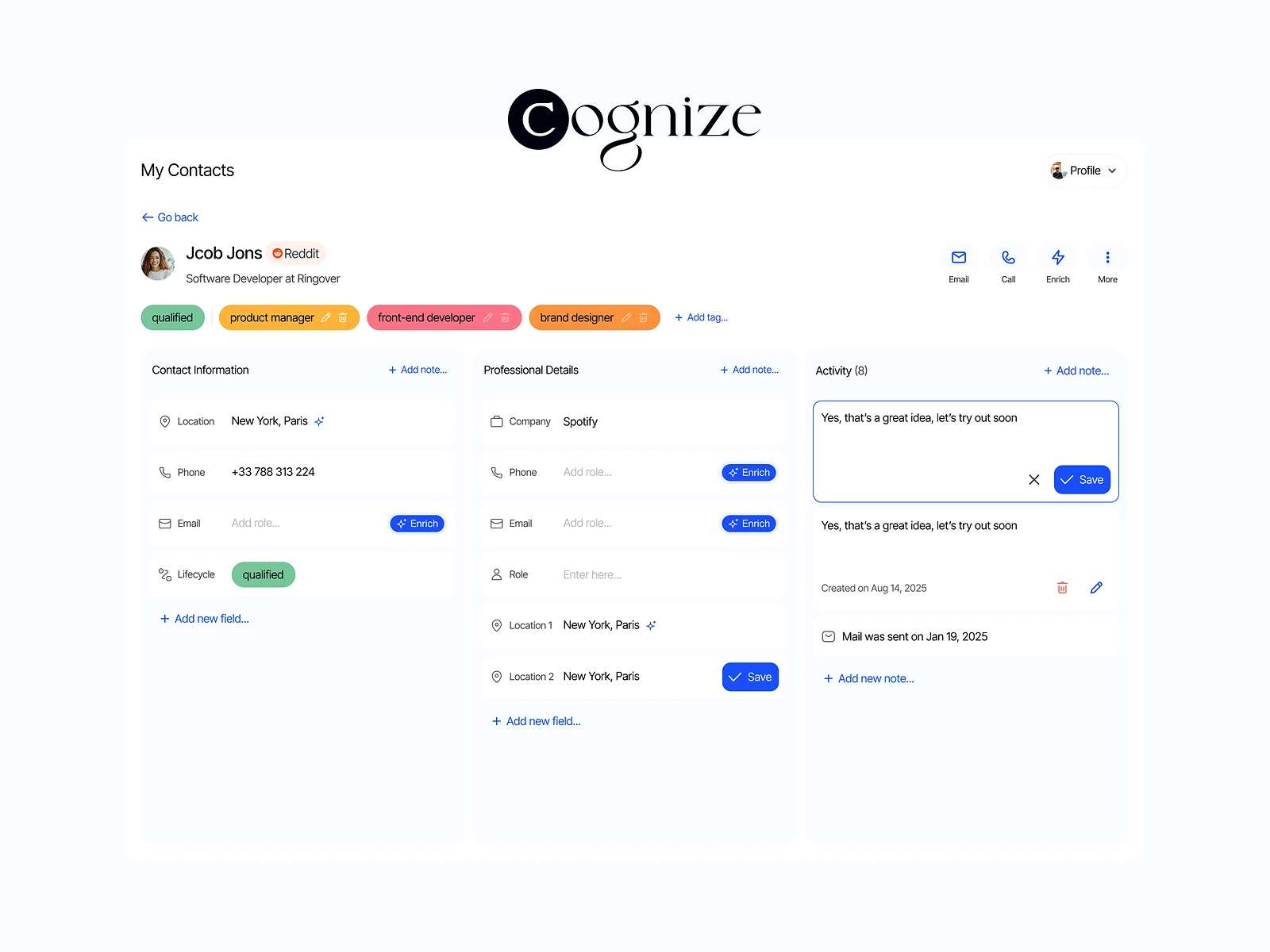
Cognize is a lightweight CRM and lead board, live at cognize.live. It helps small teams organise contacts, track lifecycle stages, enrich professional data and keep all activity history in one place, with auto summaries. It is my own product: I designed and built it.

Cognize: Lightweight lead board
Role
Design + development
Type
My own product
Platforms
Web
Scope
Product, UX, UI design, Front-end

01The problem

What needed solving

Small teams outgrow spreadsheets for leads but find full CRMs heavy, slow to set up and full of fields they never use. Notes and activity end up scattered, so nobody has the full story of a contact. Cognize had to give structure without the weight.

Who it’s for

  • Founders

    See every lead and its next step without setting up a full CRM.

  • Freelancers and consultants

    Track conversations with prospects and clients in a simple way.

  • Small sales teams

    Share history so anyone can pick up a lead.

02The main flow

From new contact to next step

The moment in blue is the one the whole design is built around.
  1. 01

    Add a contact

  2. 02

    Enrich their profile

  3. 03

    Tag lifecycle stage

  4. 04

    Log activity

  5. 05

    Read the summary

03Structure

How Cognize is organised

Everything has one home. Getting this right first keeps every screen simpler.

Board

  • Lifecycle stages
  • Lead cards
  • Filters

Contacts

  • Profile
  • Enriched data
  • Tags

Activity

  • Timeline
  • Notes
  • Auto summary

Settings

  • Stages
  • Tags
  • Account

04Key decisions

Choices that shaped it

What I considered, what I chose, and why.

Decision 01

A board by lifecycle stage

Contact lists show who you know but not where each relationship stands.

Considered

A table of contacts with a stage column.

Chosen

The home view is a board with a column for each lifecycle stage, and moving a card moves the lead on.

Why it works

Stage is the question people ask most. A board answers it before they read anything.
Decision 02

Summaries above the timeline

A long activity history is complete but slow to read before a call.

Considered

Show only the raw timeline, newest first.

Chosen

Each contact opens with an auto summary of its history, with the full timeline below for detail.

Why it works

The summary gets someone up to speed fast. The timeline keeps the source visible, so the summary can always be checked.

Decision 03

Enrichment you can see and edit

Auto-enriched data can be wrong or out of date, and silent changes break trust in a CRM.

Considered

Overwrite contact fields automatically whenever new data is found.

Chosen

Enriched fields are labelled as enriched and stay editable like any other field.

Why it works

People stay in charge of their own data. The label shows where each value came from.

05What’s inside

Key features

Lead board

Every lead on one board, grouped by lifecycle stage.

Profile enrichment

Adds professional data to contacts so profiles fill out faster.

Auto summaries

A short summary of each contact’s history, above the full timeline.

Activity tracking

Notes and activity in one timeline for each contact.

Lifecycle tagging

Tags that mark where each contact stands, from lead to client.

06How it was built

Designed and built

I designed it and wrote the code, so the design survived contact with reality.

Interface

  • React
  • Next.js
  • Board and timeline components

Services

  • Node.js API
  • Enrichment service

AI

  • LLM API for summaries
  • Prompt templates

Data

  • PostgreSQL
  • Activity log

07Outcome

What was delivered

Delivered

  • A live product at cognize.live
  • A lead board with lifecycle stages and tagging
  • Contact profiles with enrichment and an activity timeline
  • Auto summaries of each contact’s history
  • Front-end and back-end designed and built by me

What I learned

  1. 01

    A CRM gets lighter when you decide which questions it must answer and drop the rest.

  2. 02

    AI summaries are trusted when the source is one scroll away.

Next step

Tell me what you're building.
I'll tell you how I'd ship it.

Pick a time that suits you. You'll leave the call with a clear next step, whether we work together or not.

Book a free call

Free · 30 minutes · No commitment

Prefer email? prashantkumarsingh.work@gmail.com