Skip to content

Freelance project · AI products

AI Governance Console

See how your workforce uses AI, and keep sensitive data out of it

An admin console for real-time oversight of how employees use AI tools: it monitors prompts, redacts sensitive data, governs MCP tool use and brings risks into one dashboard. It’s built for security and IT teams. I designed the product end to end, from the overview and policy screens to agent observability, device inventory and the audit log.

AI Governance Console: Oversight of employee AI use
Role
Product design
Type
Freelance
Platforms
Web
Scope
UX, UI design, Dashboards, Design system

01The problem

What needed solving

Employees now use AI chat tools, code assistants and vendor agents every day, often with company data, and security teams can’t see most of it. The product had to make that activity visible and governable without turning into a wall of logs only a specialist could read.

Who it’s for

  • Security teams

    Rules that stop sensitive data reaching AI tools, and proof that the rules work.

  • IT admins

    One place to approve MCP servers, manage devices and roll out the product.

  • Compliance and audit

    A record of every action that no one can edit and that they can export.

  • Engineering leads

    A view of which code assistants and agents run in developer IDEs.

02The main flow

From rollout to enforcement

The moment in blue is the one the whole design is built around.
  1. 01

    Deploy to devices

  2. 02

    See AI usage

  3. 03

    Spot a risk

  4. 04

    Set a policy

  5. 05

    Review the audit log

03Structure

How AI Governance Console is organised

Everything has one home. Getting this right first keeps every screen simpler.

Overview

  • Workforce AI use
  • Prompt analytics
  • App usage

Protection

  • Prompt Protection
  • Classifier engine
  • LLM connectors

MCP Security

  • Invocation policies
  • MCP Catalog

Observability

  • IDE agents
  • Vendor agents
  • Device Inventory

Admin

  • Audit log
  • Download and Deploy
  • Plugins and Add-ons
  • Settings

04Key decisions

Choices that shaped it

What I considered, what I chose, and why.

Decision 01

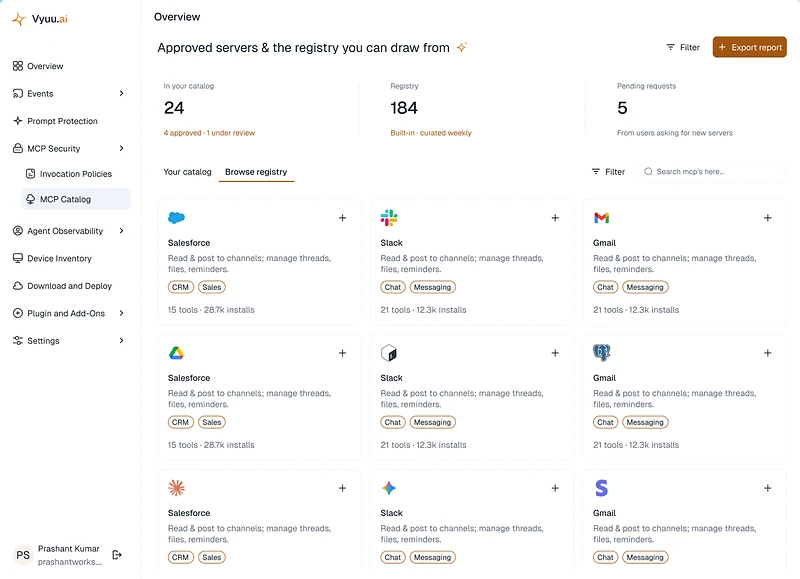
Approve MCP servers from a catalogue

MCP lets AI tools call other systems, so one unvetted server can give an assistant access to CRM, chat or email data.

Considered

A blocklist where admins react to risky servers after they appear.

Chosen

I designed an MCP Catalog of approved servers and the registry admins can draw from, with tool and install counts on each connector. Invocation policies then set what each tool may do.

Why it works

An allowlist is safer by default and easier to reason about. The counts show how much each approval opens up before an admin clicks it.
Decision 02

Redact, don’t just block

Blocking every prompt that holds sensitive data stops leaks, but it also pushes people towards tools the company can’t see.

Considered

Block-only rules that stop the prompt and show an error.

Chosen

Prompt Protection rules can redact the sensitive part and let the rest of the prompt through. The classifier engine and its LLM connectors decide what counts as sensitive.

Why it works

People keep using approved tools, which keeps their AI use visible, and the sensitive data still never leaves.

Decision 03

Split agents by where they act

AI agents reach company data through two very different doors: code assistants inside developer IDEs and vendor agents connected to business systems.

Considered

One combined list of every AI agent the product detects.

Chosen

Agent Observability shows code assistants and agents observed in developer IDEs separately from vendor agents operating on corporate data, each with its own columns.

Why it works

The two carry different risks and have different owners, engineering for one and IT or security for the other. Each list now speaks to the person who can act on it.

05What’s inside

Key features

Prompt analytics

Shows how the workforce uses AI, which apps they use and where sensitive data appears.

Prompt Protection

Rules that detect and redact sensitive data before a prompt reaches an AI tool.

MCP Security

Invocation policies and a catalogue of approved MCP servers with tool and install counts.

Agent Observability

Lists code assistants in developer IDEs and vendor agents working on corporate data.

Device Inventory

Shows browser extensions observed on endpoints, so admins can spot unapproved AI tools.

Immutable audit log

Records every action and ships it to the security team’s existing tools.

06Screens

Selected screens

Tap any screen to open it full size.

07Outcome

What was delivered

Delivered

  • Overview dashboard with prompt analytics and app usage
  • Prompt Protection rules, classifier engine and LLM connector screens
  • MCP Security with invocation policies and the MCP Catalog
  • Agent Observability, Device Inventory and the immutable audit log
  • Download and Deploy, Plugins and Add-ons and Settings, built on shared components

What I learned

  1. 01

    Security teams want proof as much as protection. The audit log mattered as much as the rules.

  2. 02

    Opening each screen with the question it answers made a dense product easier to find your way around.

  3. 03

    Governance only works if people keep using the approved tools, so the design had to protect without getting in the way.

Next step

Tell me what you're building.
I'll tell you how I'd ship it.

Pick a time that suits you. You'll leave the call with a clear next step, whether we work together or not.

Book a free call

Free · 30 minutes · No commitment

Prefer email? prashantkumarsingh.work@gmail.com