Skip to content

Freelance project · Mobile apps

CareLoop

A clean UI kit for building healthtech and eldercare apps faster

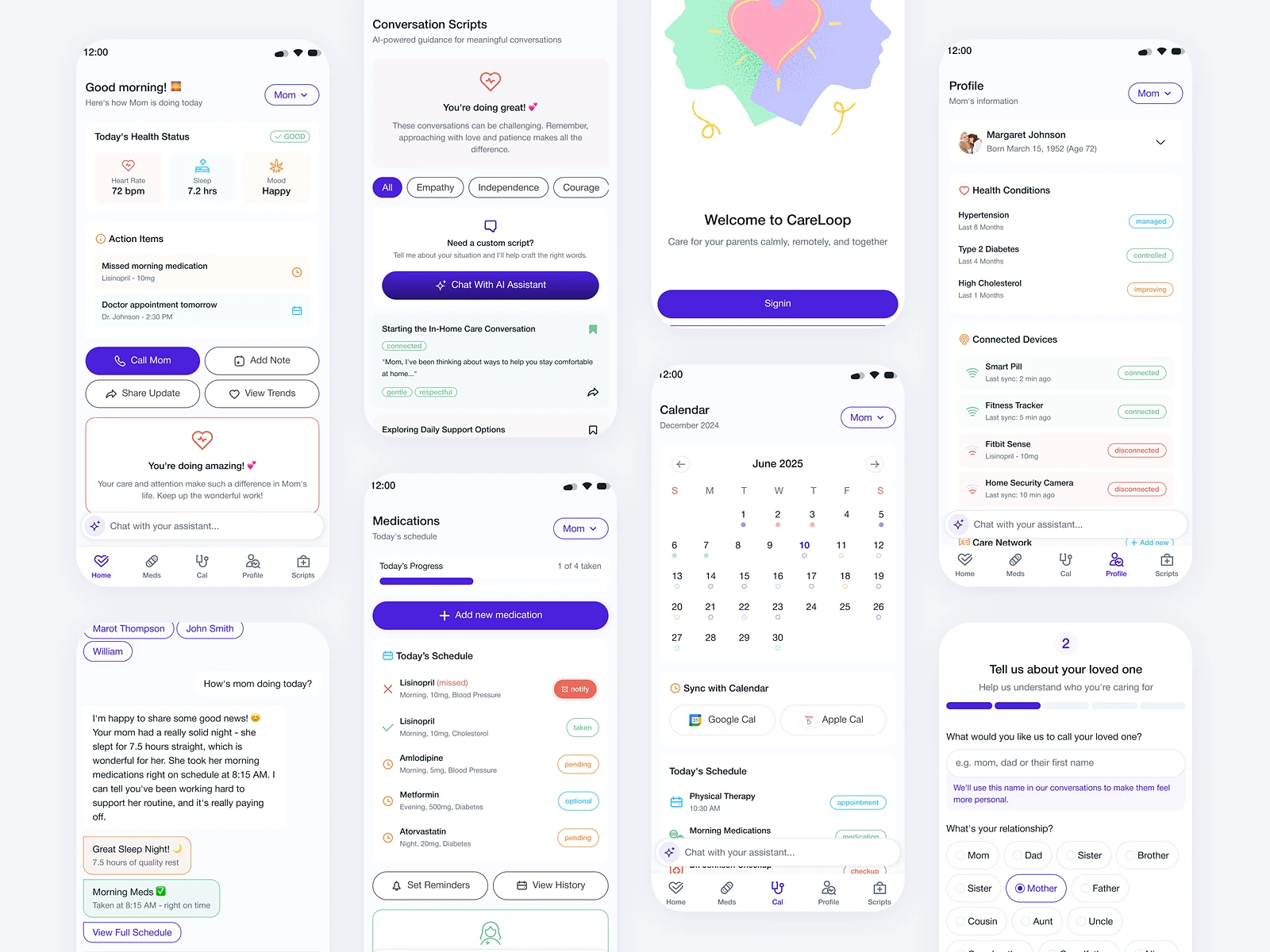
CareLoop is a modern UI kit for founders, designers and developers building healthtech or eldercare apps. It is designed around people caring for ageing parents, with calm, accessible components for everyday care. I designed the kit and the example screens that show it in use.

CareLoop: UI kit for eldercare apps
Role
Product design
Type
Freelance
Platforms
iOS, Android
Scope
UI kit, Mobile UI, Accessibility

01The problem

What needed solving

Teams building eldercare apps often start from generic UI kits made for fitness or banking. Those kits rarely suit carers who are tired, busy and managing medicines, appointments and worries for someone else. CareLoop needed components that are calm, legible and ready for care-specific screens.

Who it’s for

  • Founders

    Have a credible starting point to test an eldercare idea quickly.

  • Designers

    Adapt accessible components without starting from scratch.

  • Developers

    Work from consistent, well-named components that map cleanly to code.

  • Carers

    Use screens that stay calm and easy to read under stress.

02The main flow

A carer’s daily check

The moment in blue is the one the whole design is built around.
  1. 01

    Open today’s care plan

  2. 02

    Check medicine reminders

  3. 03

    Log a dose

  4. 04

    See upcoming appointments

  5. 05

    Add a care note

03Structure

How CareLoop is organised

Everything has one home. Getting this right first keeps every screen simpler.

Foundations

  • Colour
  • Type
  • Spacing
  • Icons

Components

  • Cards
  • Lists
  • Forms
  • Reminders

Care patterns

  • Care plan
  • Medicine tracker
  • Appointments

Example screens

  • Home
  • Parent profile
  • Care notes

04Key decisions

Choices that shaped it

What I considered, what I chose, and why.

Decision 01

Large type as the default

Carers read on the go, often tired, and many eldercare apps are also used by older people themselves.

Considered

Standard mobile type sizes with an optional larger setting.

Chosen

I set a larger base type size and generous touch targets across the kit, so accessible sizing is the starting point, not an option.

Why it works

Teams rarely revisit defaults. Building accessibility into the base means every screen made with the kit starts readable.

Decision 02

Calm colours, clear alerts

Health apps often use strong reds and alerts everywhere, which adds stress to an already stressful job.

Considered

A bright, high-alert palette with red for every warning.

Chosen

I used a soft, warm palette for most of the interface and kept strong colour for real alerts, always paired with an icon and a label.

Why it works

When everything shouts, nothing stands out. Saving strong colour for what matters keeps it meaningful.

Decision 03

Care-specific components in the kit

Generic kits give buttons and cards but leave teams to design medicine reminders and care logs from scratch.

Considered

A general-purpose kit with a health-themed colour palette.

Chosen

I included care-specific components, such as medicine reminders, appointment cards and care notes, built from the same base parts.

Why it works

Those are the pieces every eldercare app needs. Having them in the kit takes the hardest part of a first version off a team’s plate.

05What’s inside

Key features

Care components

Medicine reminders, appointment cards and care notes, ready to use.

Accessible foundations

Type, contrast and touch targets set with accessibility in mind.

Appointment patterns

Cards and lists for upcoming visits and check-ups.

Gentle reminders

Reminder styles that inform without alarming.

Example screens

Care screens that show how the kit fits together.

06Outcome

What was delivered

Delivered

  • A mobile UI kit with foundations, base components and care-specific components
  • Accessible defaults for type, contrast and touch targets
  • Example care screens built from the kit
  • Named components and variants ready for designers and developers

What I learned

  1. 01

    Accessibility is easiest when it is the default, not a setting.

  2. 02

    A UI kit earns its place when it solves the domain’s awkward pieces, not just buttons and inputs.

Next step

Tell me what you're building.
I'll tell you how I'd ship it.

Pick a time that suits you. You'll leave the call with a clear next step, whether we work together or not.

Book a free call

Free · 30 minutes · No commitment

Prefer email? prashantkumarsingh.work@gmail.com