Skip to content

Freelance project · Websites

Car Repair Booking Platform

A premium body repair website that turns visitors into bookings staff can act on

A website and bookings admin for a UK car body repair centre. The dark, premium website guides visitors to book a repair, and the admin gives staff each booking with an AI price estimate, photos, status and history in one place. I designed the website, the admin and the automated emails.

Car Repair Booking Platform: Website and bookings admin
Role
Product design
Type
Freelance
Platforms
Web
Scope
Website UX, UI design, Admin dashboard, Email templates

01The problem

What needed solving

People looking for body repair have usually just had damage they did not plan for, and they want to know the cost and how to get it fixed. For staff, a booking is only useful if it arrives with the details, photos and contact routes needed to quote and follow up. The platform had to make booking easy for customers and make every booking ready to act on.

Who it’s for

  • Car owners with damage

    Find the right service and book a repair without a long back-and-forth.

  • Insurance and fleet customers

    See that the centre handles claims and fleet work before they get in touch.

  • Front-office staff

    Open a booking and have the photos, estimate and contact actions ready to use.

  • Workshop managers

    See every booking’s status at a glance.

02The main flow

From damage to booked repair

The moment in blue is the one the whole design is built around.
  1. 01

    Choose a service

  2. 02

    Book with car photos

  3. 03

    AI estimates a price range

  4. 04

    Staff call or email

  5. 05

    Status moves to Completed

03Structure

How Car Repair Booking Platform is organised

Everything has one home. Getting this right first keeps every screen simpler.

Website

  • Services
  • Common questions
  • Contact
  • Book now

Bookings

  • Bookings list
  • Status and category filters
  • Search

Booking detail

  • Overview
  • Customer details
  • Car photos
  • Activity timeline

Actions

  • Change status
  • Send email
  • Make call
  • Add comment

Enquiries and emails

  • Contact enquiries
  • Automated emails

04Key decisions

Choices that shaped it

What I considered, what I chose, and why.

Decision 01

AI estimate as a price range

An estimate made before anyone has inspected the car can’t be exact. A single figure reads like a quote, and staff then have to walk it back.

Considered

Show one £ figure as the AI estimate on each booking.

Chosen

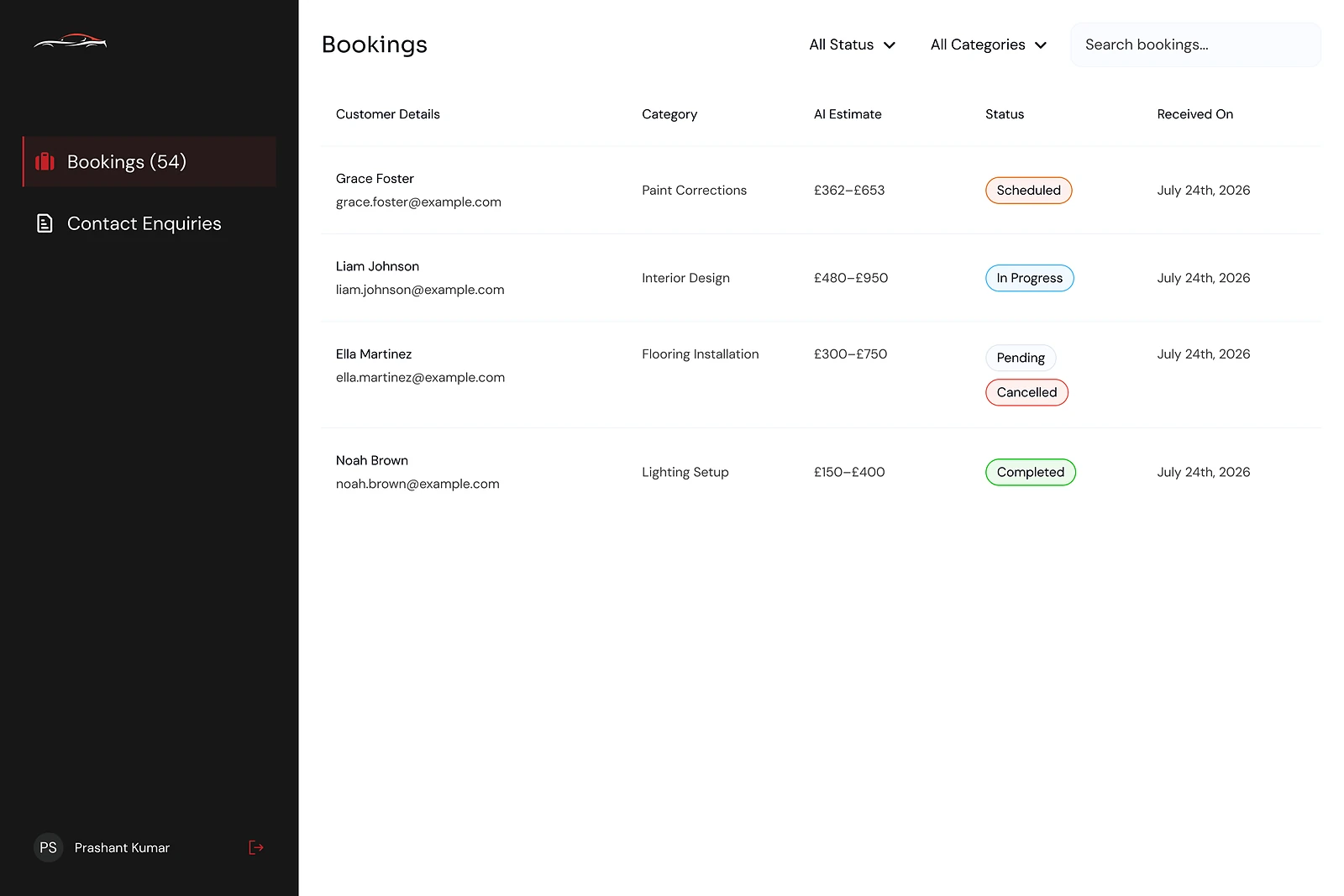
I showed the AI estimate as a £ range in the bookings list and on the booking detail, clearly labelled as an AI estimate.

Why it works

A range is honest about uncertainty and still tells staff the size of a job at a glance. The final price stays with the people who inspect the car.

Decision 02

Everything to act on one page

To handle a booking, staff need the customer’s details, the car photos, the history and a way to get in touch. Spread across an inbox, a phone and a spreadsheet, that means switching tools for every job.

Considered

A read-only booking record, with emails and calls handled in separate tools.

Chosen

The booking detail page holds the overview, customer details, car photos, an activity timeline with comments, a status control, and Send email and Make call buttons.

Why it works

Staff can review a job, contact the customer and update the status without leaving the page. The timeline keeps the story of each job in one place for whoever picks it up next.

Decision 03

Book now always within reach

Some visitors are ready to book the moment they land, while others want to ask a question first. A booking route hidden on a contact page loses both.

Considered

A single contact form at the bottom of the site.

Chosen

Book now and the phone number sit in the header on every page, the services lead to booking, and Common questions answers doubts before they become reasons to leave.

Why it works

Every visitor has a next step from anywhere on the site. The FAQs do the reassuring that a phone call would otherwise have to do.

05What’s inside

Key features

AI price estimate

Each booking shows an AI estimate as a £ range, so staff see the size of a job at once.

Status at a glance

Scheduled, In progress, Pending, Cancelled and Completed chips, with filters by status and category.

Car photos on file

Photos sent with the booking sit on its detail page for staff to assess.

Call or email directly

Send email and Make call sit on the booking, next to the customer’s details.

Automated emails

Customers get consistent emails sent straight from the admin.

06Screens

Selected screens

Tap any screen to open it full size.

07Outcome

What was delivered

Delivered

  • A dark, premium website with services, Common questions and a contact page, and Book now with the phone number in the header
  • A bookings admin with sign-in, a bookings list showing AI estimate ranges and status chips, plus filters and search
  • A booking detail page with overview, customer details, car photos, activity timeline, status change, Send email and Make call
  • A Contact enquiries view alongside bookings
  • Automated email templates sent from the admin

What I learned

  1. 01

    When AI gives a price before a person has looked, a range is more honest and more useful than a single figure.

  2. 02

    An admin tool earns its place when staff can finish a task on one page.

  3. 03

    A premium look sets the expectation, but a visible Book now and phone number are what turn a visit into a booking.

Next step

Tell me what you're building.
I'll tell you how I'd ship it.

Pick a time that suits you. You'll leave the call with a clear next step, whether we work together or not.

Book a free call

Free · 30 minutes · No commitment

Prefer email? prashantkumarsingh.work@gmail.com